Getting rid of nginx, mysql, php and Wordpress…
I am frustrated at times with HUGO. Sometimes the themes are out of date and won’t run on a modern version of HUGO. They make underlying assumptions about the environment that add dependencies like npm. Hacking the style elements can be difficult depending on how abstracted a theme makes them. Making a layout template or a list or an image shortcode work can be hours of debugging. But overall, I love the final product. The static sites generated are fast and once debugged extremely stable.
With a static site I found I no longer required an EC2 instance. I no longer needed a mysql database to backend a Wordpress installation. I no longer needed an nginx config and fastCGI, php configuration and a lot of complexity to serve pages. It could be an S3 bucket and a cloudfront distribution, with a cloudfront function to append “/” to urls. It could be much much faster and much more secure. It could be completely instantiated by terraform, and both the infrastructure and content could be checked into a repo on github.
I got there, but it took about 9 weeks of a series of conversations with ChatGPT and then vetting the resulting code for actually working and not being an hallucination by an AI. I tried and discarded a LOT of HUGO themes. I wanted a style that was simple, had some focus on images for each post, maybe tiles…
What I have now is one repo in github for the HUGO site and content. One repo in github for the infrastructure. And a third set of folders on disk for images, outside of github, because the size would make it prohibitive to manage in a repository. Instead it lives on several SSD drives and in the cloud.
The HUGO content started with the Dream theme, with minimal customization. I copied the theme up and out of the themes directory once I tested Dream, making it the style for the entire site. This makes customization much more straightforward to me.
The copy process was
1
2
3
4
5
6
| dsm$ cd dougmunsinger.com
dsm$ cd themes/
dsm$ cd ..
dsm$ cp -r themes/Dream/* .
dsm$ cp -r themes/Dream/.* . 2>/dev/null # for "." files
dsm$ rm -rf ./themes/*
|
Once that was in place I kept tweaking and asking specific questions of ChatGPT to get the cover image, the menu items, syntax highlighting, site title and logo, the flip-it code, all working. I added a to-the-top button in css and javascript. I started adding content (this post).
I brought in my résumé, creating a page for that, and adding the download versions, because part of the purpose of this website is skills advertising.
I added About content. I started looking at what to add to the Flip-It page - it by default starts with the About page, and can be added to from that.
I brought my domain name into AWS to allow the SSL cert to be managed and issued for use by cloudfront directly.
design
A blue deploy s3 bucket, and a green deploy s3 bucket. One is the origin for the cloudfront distribution, the other is staging.
A variable active_bucket controls which bucket is configured as the origin for cloudfront.
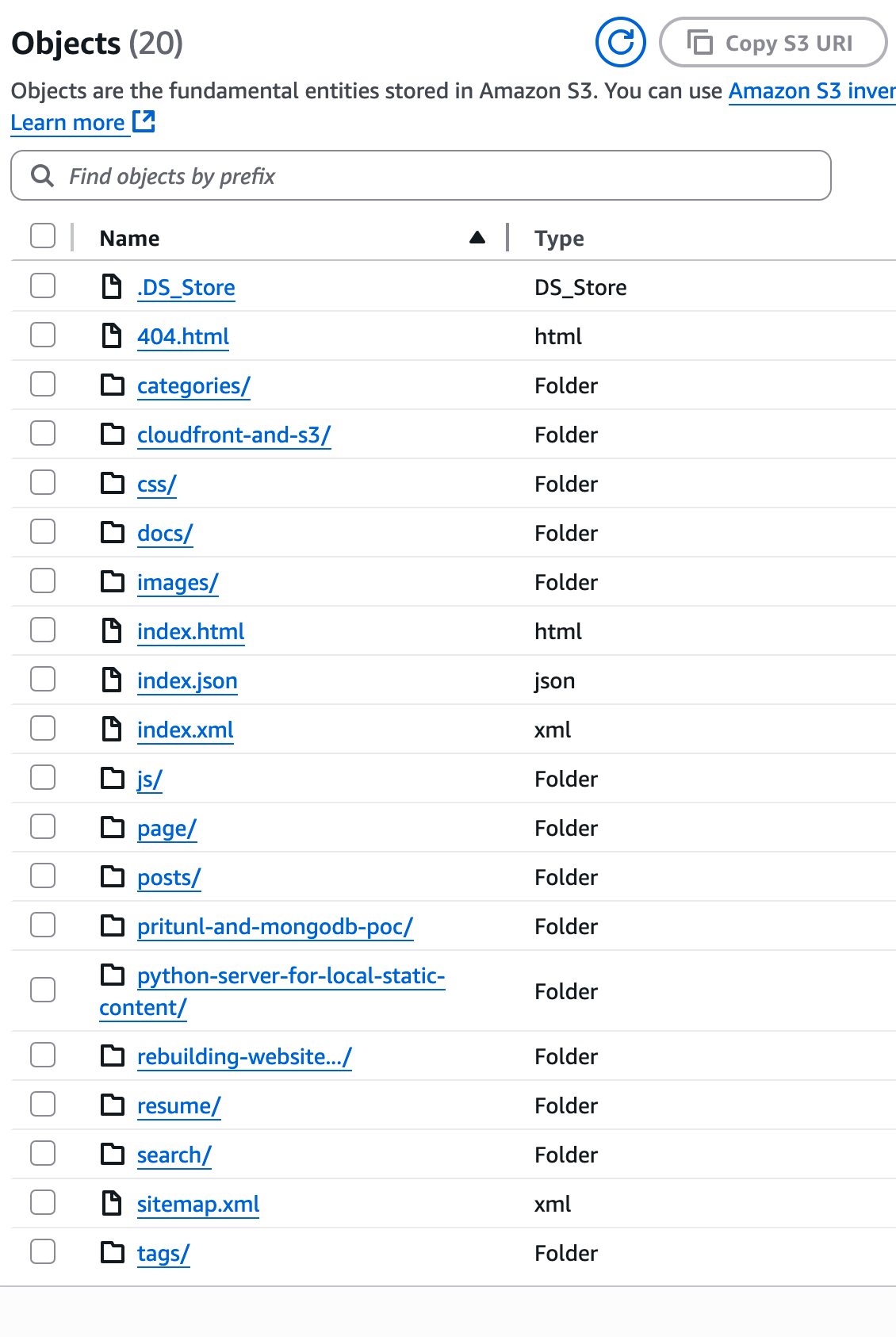
HUGO arranges content in folders, within which is an index.html file. Thus the url https://dougmunsinger.com/about/
goes to the about folder and displays the index.html within. HUGO generates content in a folder named public, the content of that folder is synced into the s3 bucket and the bucket setup as a website.
HUGO public
  1
  2
  3
  4
  5
  6
  7
  8
  9
 10
 11
 12
 13
 14
 15
 16
 17
 18
 19
 20
 21
 22
 23
 24
 25
 26
 27
 28
 29
 30
 31
 32
 33
 34
 35
 36
 37
 38
 39
 40
 41
 42
 43
 44
 45
 46
 47
 48
 49
 50
 51
 52
 53
 54
 55
 56
 57
 58
 59
 60
 61
 62
 63
 64
 65
 66
 67
 68
 69
 70
 71
 72
 73
 74
 75
 76
 77
 78
 79
 80
 81
 82
 83
 84
 85
 86
 87
 88
 89
 90
 91
 92
 93
 94
 95
 96
 97
 98
 99
100
101
102
103
104
105
106
107
108
109
110
111
112
113
114
115
116
117
118
119
120
121
122
123
124
125
126
127
128
129
130
131
132
133
134
135
136
137
138
139
140
141
142
143
144
145
146
147
148
149
150
151
152
| public/
├── 404.html
├── categories
│ ├── index.html
│ ├── index.xml
│ ├── page
│ │ └── 1
│ │ └── index.html
│ ├── sysadminnotes
│ │ ├── index.html
│ │ ├── index.xml
│ │ └── page
│ │ └── 1
│ │ └── index.html
│ └── website
│ ├── index.html
│ ├── index.xml
│ └── page
│ └── 1
│ └── index.html
├── cloudfront-and-s3
│ └── index.html
├── css
│ └── output.css
├── docs
│ └── static_export.pdf
├── images
│ ├── 20250606_rebuilding_website
│ │ ├── dm_com_narrow.png
│ │ └── dm_com_wide.png
│ ├── 20250706_cloudfront
│ │ └── s3.png
│ ├── 20250706_rebuilding_website
│ │ ├── dm_com_narrow.png
│ │ └── dm_com_wide.png
│ ├── black_and_white
│ │ ├── black_and_white_0003.jpg
│ │ ├── black_and_white_0006.jpg
│ │ ├── black_and_white_0007.jpg
│ │ ├── black_and_white_0008.jpg
│ │ ├── black_and_white_0012.jpg
│ │ ├── black_and_white_0013.jpg
│ │ ├── black_and_white_0015.jpg
│ │ ├── black_and_white_0016.jpg
│ │ ├── black_and_white_0018.jpg
│ │ ├── black_and_white_0019.jpg
│ │ ├── black_and_white_0020.jpg
│ │ ├── black_and_white_0021.jpg
│ │ ├── black_and_white_0022.jpg
│ │ ├── black_and_white_0023.jpg
│ │ ├── black_and_white_0024.jpg
│ │ ├── black_and_white_0025.jpg
│ │ ├── black_and_white_0026.jpg
│ │ ├── black_and_white_0033.jpg
│ │ └── black_and_white_0035.jpg
│ ├── book.png
│ ├── dsm_zoom.jpg
│ ├── flip.png
│ ├── toolbelt.jpg
│ ├── untitled folder
│ └── website
├── index.html
├── index.json
├── index.xml
├── js
│ ├── custom-search.js
│ ├── grid.js
│ ├── main.js
│ ├── to-top-button.js
│ └── toc.js
├── page
│ └── 1
│ └── index.html
├── posts
│ └── index.html
├── pritunl-and-mongodb-poc
│ └── index.html
├── python-server-for-local-static-content
│ └── index.html
├── rebuilding-website...
│ └── index.html
├── resume
│ ├── current_resume.pages
│ ├── current_resume.pdf
│ ├── current_resume.rtf
│ ├── current_resume.txt
│ └── index.html
├── search
│ └── index.html
├── sitemap.xml
└── tags
├── atlas
│ ├── index.html
│ ├── index.xml
│ └── page
│ └── 1
│ └── index.html
├── cloudfront
│ ├── index.html
│ ├── index.xml
│ └── page
│ └── 1
│ └── index.html
├── hugo
│ ├── index.html
│ ├── index.xml
│ └── page
│ └── 1
│ └── index.html
├── index.html
├── index.xml
├── mongodb
│ ├── index.html
│ ├── index.xml
│ └── page
│ └── 1
│ └── index.html
├── page
│ └── 1
│ └── index.html
├── pritunl
│ ├── index.html
│ ├── index.xml
│ └── page
│ └── 1
│ └── index.html
├── python
│ ├── index.html
│ ├── index.xml
│ └── page
│ └── 1
│ └── index.html
├── s3
│ ├── index.html
│ ├── index.xml
│ └── page
│ └── 1
│ └── index.html
├── terraform
│ ├── index.html
│ ├── index.xml
│ └── page
│ └── 1
│ └── index.html
└── webserver
├── index.html
├── index.xml
└── page
└── 1
└── index.html
59 directories, 91 files
|
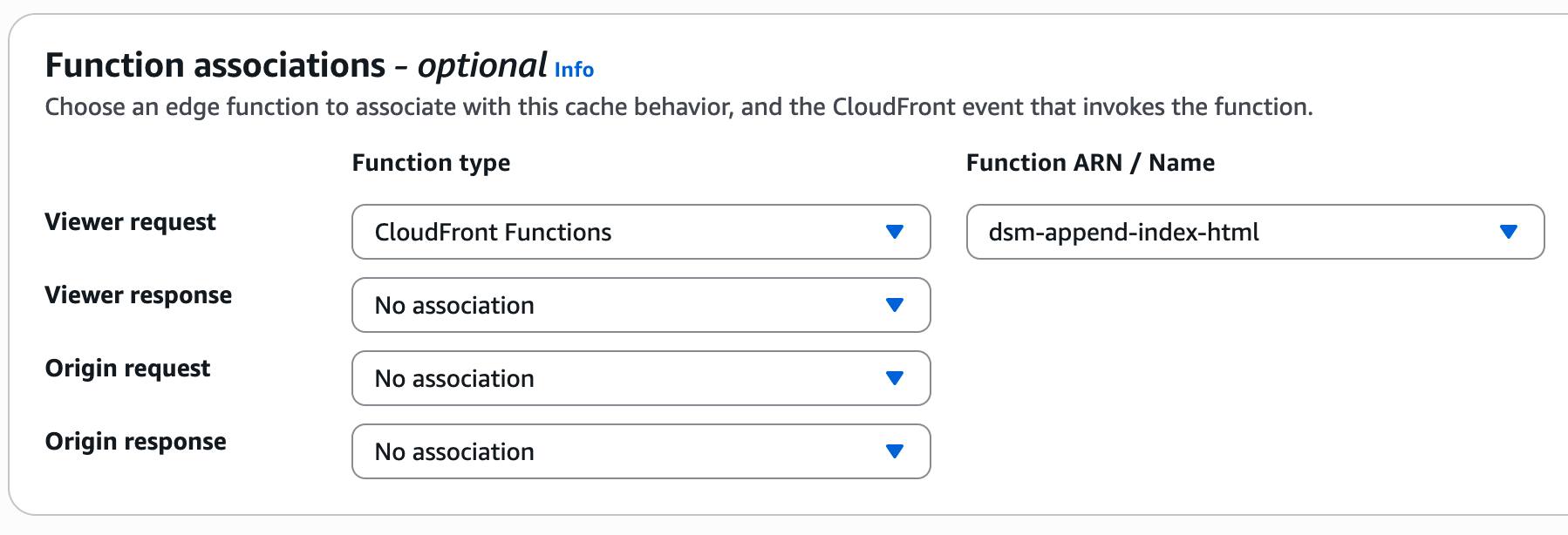
Cloudfront fails to configure this trailing / by default, you have to add a cloudfront function to properly handle this, and attach it to the cloudfront distribution under behaviors.
The cloudfront function.
 1
 2
 3
 4
 5
 6
 7
 8
 9
10
11
12
13
14
15
16
17
| function handler(event) {
var request = event.request;
var uri = request.uri;
// Ensure trailing slash for clean URLs like /about
if (!uri.includes('.') && !uri.endsWith('/')) {
uri += '/';
}
// Append index.html for paths ending in /
if (uri.endsWith('/')) {
uri += 'index.html';
}
request.uri = uri;
return request;
}
|
And attach to cloudfront distribution.
I wrote a deploy script to sync the local public directory up to the s3 buckets.
1
2
3
4
5
6
7
8
9
10
11
12
13
14
15
16
17
18
19
20
21
22
23
24
25
26
27
28
29
30
31
32
33
34
35
36
37
38
39
40
41
42
43
44
45
46
47
48
49
50
51
52
53
54
55
56
57
58
59
60
61
62
63
64
65
66
67
68
69
70
71
72
73
74
75
76
77
78
79
80
81
82
| #!/usr/bin/env bash
#
# Usage:
# ./deploy.sh [-n] [-t <green|blue>]
#
# -n : Skip deployment (makes -t unnecessary)
# -t <target> : Deploy target ('green' or 'blue'), required unless -n is used
#
set -e # Exit immediately on error
#######################################
# Parse CLI arguments with getopts
#######################################
TARGET=""
DEPLOY=1 # 1 = do deploy, 0 = skip deploy
while getopts ":t:n" opt; do
case $opt in
t)
TARGET="$OPTARG"
;;
n)
DEPLOY=0
;;
\?)
echo "Error: Invalid option '-$OPTARG'." >&2
exit 1
;;
:)
echo "Error: Option '-$OPTARG' requires an argument." >&2
exit 1
;;
esac
done
shift $((OPTIND - 1))
#######################################
# Validate input
#######################################
if [[ $DEPLOY -eq 1 ]]; then
# Deploy mode: target is required
if [[ "$TARGET" != "green" && "$TARGET" != "blue" ]]; then
echo "Error: Must specify '-t <green|blue>' unless you use '-n' to skip deploy." >&2
exit 1
fi
else
# No-deploy mode: '-t' is not required
echo "No-deploy mode enabled (-n). Skipping deployment to S3."
fi
#######################################
# 1. Clean previous builds
#######################################
echo "Removing ./public/ ..."
rm -rf ./public/
# #######################################
# # 3. Build website with Hugo
# #######################################
echo "Building site with Hugo ..."
read -p "stop any hugo dev server before deploying... Hit enter to continue..."
hugo --minify --cleanDestinationDir
#######################################
# 5. Conditional Deploy
#######################################
if [[ $DEPLOY -eq 1 ]]; then
echo "Deploying to '$TARGET' ..."
if [[ "$TARGET" == "blue" ]]; then
aws s3 sync public/ s3://dougmunsinger-blue/ --delete --profile=local_github
elif [[ "$TARGET" == "green" ]]; then
aws s3 sync public/ s3://dougmunsinger-green/ --delete --profile=local_github
fi
else
echo "Skipping deployment."
fi
echo "Done."
|
If the local test server created by hugo server -D -p 1024 is not stopped, the internal URLs in the public directory are localhost and fail once deployed. Thus, the pause to ensure the local server is shut off.
`–minify’ compresses the files, removing whitespace, but doesn’t change any internals.
Here’s the terraform for the infrastructure.
1
2
3
4
5
6
7
8
| dougmunsinger.com/
├── 00_provider.tf
├── 00_variables.tf
├── acm.tf
├── blue-s3.tf
├── cloudfront.tf
├── dns.tf
└── green-s3.tf
|
The 00_ naming is just to bring those files to the top of the file listing.
00_provider.tf
1
2
3
4
| provider "aws" {
region = "us-east-1"
profile = "local_dsm"
}
|
Simple local provider, this will use a local state file (not an S3 bucket).
00_variables.tf
Creates variables for the terraform files.
1
2
3
4
5
6
7
8
9
10
11
12
13
14
15
16
17
18
19
20
21
22
23
24
25
26
27
28
29
30
31
32
33
34
35
36
37
38
39
40
41
42
43
44
45
46
| # -------------------- variables -------------------- #
variable "blue_bucket_name" {
type = string
default = "blue-bucket-name"
description = "The name of the S3 bucket to create"
}
variable "green_bucket_name" {
type = string
default = "green-bucket-name"
description = "The name of the S3 bucket to create"
}
variable "content_types" {
type = map(string)
default = {
html = "text/html"
css = "text/css"
js = "application/javascript"
json = "application/json"
xml = "application/xml"
ico = "image/vnd.microsoft.icon"
png = "image/png"
jpg = "image/jpeg"
jpeg = "image/jpeg"
webp = "image/webp"
svg = "image/svg+xml"
txt = "text/plain"
# Extend as needed...
}
description = "Map of file extensions to MIME types"
}
variable "allowed_ips" {
description = "List of IP addresses allowed for limited access to the staging bucket"
type = list(string)
default = ["local.ip.address/mask"] # Replace with your IP addresses
}
variable "active_bucket" {
type = string
default = "blue"
# or "green"
description = "Which environment (blue or green) is currently active?"
}
|
acm.tf
AWS Certificate Manager resources, including the DNS to validate the certificate.
1
2
3
4
5
6
7
8
9
10
11
12
13
14
15
16
17
18
19
20
21
22
23
24
25
26
27
28
29
30
31
32
33
34
35
36
37
38
39
40
41
| # -------------------- cert -------------------- #
resource "aws_acm_certificate" "website_cert" {
domain_name = "example.com"
subject_alternative_names = ["www.example.com"]
validation_method = "DNS"
}
# -------------------- dns verification -------------------- #
resource "aws_route53_record" "example_com_cert_validation_records" {
# Because domain_validation_options is a set, we convert it to a map keyed by example_com
for_each = {
for dvo in aws_acm_certificate.example_com_cert.domain_validation_options :
dvo.example_com => {
record_name = dvo.resource_record_name
record_type = dvo.resource_record_type
record_value = dvo.resource_record_value
}
}
zone_id = aws_route53_zone.example_com.zone_id
name = each.value.record_name
type = each.value.record_type
records = [each.value.record_value]
ttl = 300
allow_overwrite = true
}
# -------------------- validate cert -------------------- #
resource "aws_acm_certificate_validation" "example_com_cert_validation" {
certificate_arn = aws_acm_certificate.example_com_cert.arn
# Build a list of all fqdn attributes from the route53_record for_each
validation_record_fqdns = [
for record in aws_route53_record.example_com_cert_validation_records : record.fqdn
]
}
|
blue-s3.tf
Creates the blue deploy bucket.
1
2
3
4
5
6
7
8
9
10
11
12
13
14
15
16
17
18
19
20
21
22
23
24
25
26
27
28
29
30
31
32
33
34
35
36
37
38
39
40
41
42
43
44
45
46
47
48
49
50
51
52
53
54
55
56
57
58
59
60
61
62
63
64
65
66
67
68
69
70
71
72
73
74
75
76
77
78
79
80
81
82
83
84
85
86
87
88
89
90
91
92
93
94
95
96
97
98
99
100
101
102
103
104
105
| # -------------------- bucket -------------------- #
resource "aws_s3_bucket" "blue_bucket" {
bucket = var.blue_bucket_name
# Tag the bucket (optional)
tags = {
Name = var.blue_bucket_name
Environment = "BlueGreen"
}
}
# -------------------- website -------------------- #
resource "aws_s3_bucket_website_configuration" "blue_bucket_website" {
bucket = aws_s3_bucket.blue_bucket.id
index_document {
suffix = "index.html"
}
error_document {
key = "error.html"
}
# routing_rules = jsonencode([
# {
# Condition = {
# HttpErrorCodeReturnedEquals = "404"
# }
# Redirect = {
# ReplaceKeyWith = "404.html"
# }
# },
# {
# Condition = {
# HttpErrorCodeReturnedEquals = "403"
# }
# Redirect = {
# ReplaceKeyWith = "403.html"
# }
# },
# {
# Condition = {
# HttpErrorCodeReturnedEquals = "410"
# }
# Redirect = {
# ReplaceKeyWith = "410.html"
# }
# },
# {
# Condition = {
# HttpErrorCodeReturnedEquals = "500"
# }
# Redirect = {
# ReplaceKeyWith = "500.html"
# }
# },
# {
# Condition = {
# HttpErrorCodeReturnedEquals = "503"
# }
# Redirect = {
# ReplaceKeyWith = "503.html"
# }
# }
# ])
}
# -------------------- public access -------------------- #
# control block public access
resource "aws_s3_bucket_public_access_block" "blue_bucket_public_access_block" {
bucket = aws_s3_bucket.blue_bucket.id
block_public_acls = false
block_public_policy = false
ignore_public_acls = false
restrict_public_buckets = false
}
# create doc
data "aws_iam_policy_document" "blue_bucket_public_read_get_object" {
statement {
sid = "AllowPublicRead"
effect = "Allow"
principals {
type = "AWS"
identifiers = ["*"]
}
actions = ["s3:GetObject"]
resources = [
"${aws_s3_bucket.blue_bucket.arn}/*"
]
}
}
# policy
resource "aws_s3_bucket_policy" "blue_bucket_policy" {
bucket = aws_s3_bucket.blue_bucket.id
policy = data.aws_iam_policy_document.blue_bucket_public_read_get_object.json
}
|
cloudfront.tf
Creates the cloudfront distribution, assigned origin based on active_bucket variable, and creates and attaches the cloudfront function to the distribution.
1
2
3
4
5
6
7
8
9
10
11
12
13
14
15
16
17
18
19
20
21
22
23
24
25
26
27
28
29
30
31
32
33
34
35
36
37
38
39
40
41
42
43
44
45
46
47
48
49
50
51
52
53
54
55
56
57
58
59
60
61
62
63
64
65
66
67
68
69
70
71
72
73
74
75
76
77
78
79
80
81
82
83
84
85
86
87
88
89
90
91
92
93
94
95
96
97
98
99
100
101
102
103
104
105
106
107
108
109
110
111
112
113
114
115
116
117
118
119
120
121
122
123
124
125
126
127
128
129
130
131
132
133
134
135
136
137
138
139
140
141
142
143
144
145
146
147
| # -------------------- origin access control -------------------- #
resource "aws_cloudfront_origin_access_control" "blue_oac" {
name = "blue-oac"
description = "OAC for public S3 bucket"
origin_access_control_origin_type = "s3"
signing_behavior = "always"
signing_protocol = "sigv4"
}
# -------------------- cloudfront -------------------- #
locals {
s3_origin_id = "dougmunsinger"
active_bucket_example_com = (
var.active_bucket == "blue"
? aws_s3_bucket.blue_bucket.bucket_regional_example_com
: aws_s3_bucket.green_bucket.bucket_regional_example_com
)
}
resource "aws_cloudfront_distribution" "blue_distribution" {
enabled = true
is_ipv6_enabled = true
comment = "Blue/Green Cloudfront Distribution"
default_root_object = "index.html"
origin {
domain_name = local.active_bucket_example_com
origin_id = local.s3_origin_id
origin_access_control_id = aws_cloudfront_origin_access_control.blue_oac.id
}
default_cache_behavior {
target_origin_id = local.s3_origin_id
viewer_protocol_policy = "redirect-to-https"
allowed_methods = ["GET", "HEAD"]
cached_methods = ["GET", "HEAD"]
forwarded_values {
query_string = false
cookies {
forward = "none"
}
}
min_ttl = 0
default_ttl = 3600
max_ttl = 86400
# Add this block:
function_association {
event_type = "viewer-request"
function_arn = aws_cloudfront_function.append_index_html.arn
}
compress = true
}
# # Custom error pages
# custom_error_response {
# error_code = 404
# response_page_path = "/404.html"
# response_code = 404
# error_caching_min_ttl = 0
# }
# custom_error_response {
# error_code = 403
# response_page_path = "/403.html"
# response_code = 403
# error_caching_min_ttl = 0
# }
# custom_error_response {
# error_code = 500
# response_page_path = "/500.html"
# response_code = 500
# error_caching_min_ttl = 0
# }
# custom_error_response {
# error_code = 503
# response_page_path = "/503.html"
# response_code = 503
# error_caching_min_ttl = 0
# }
# -------------------- Use your Custom Domain & ACM Cert -------------------- #
# These aliases must match the domains in your ACM cert
aliases = [
"example_com",
"www.example_com"
]
viewer_certificate {
# Reference the ARN from your *validated* ACM cert resource in us-east-1.
# For example, if your resource is named
# `aws_acm_certificate_validation.dougmunsinger_cert_validation`,
# you can do:
acm_certificate_arn = aws_acm_certificate_validation.example_com_cert_validation.certificate_arn
ssl_support_method = "sni-only"
minimum_protocol_version = "TLSv1.2_2019"
}
price_class = "PriceClass_100"
restrictions {
geo_restriction {
restriction_type = "none"
}
}
# Optional logging, tags, etc.
}
# -------------------- custom function for urls ending in "/" -------------------- #
resource "aws_cloudfront_function" "append_index_html" {
name = "dsm-append-index-html"
runtime = "cloudfront-js-1.0"
# This JavaScript runs on every viewer request.
# If the path ends with "/", append "index.html".
code = <<-EOF
function handler(event) {
  var request = event.request;
  var uri = request.uri;

  // Ensure trailing slash for clean URLs like /about
  if (!uri.includes('.') && !uri.endsWith('/')) {
    uri += '/';
  }

  // Append index.html for paths ending in /
  if (uri.endsWith('/')) {
    uri += 'index.html';
  }

  request.uri = uri;
  return request;
}
EOF
}
|
dns.tf
Creates the needed DNS.
1
2
3
4
5
6
7
8
9
10
11
12
13
14
15
16
17
18
19
20
21
22
23
24
25
26
27
28
29
30
31
32
33
34
35
36
37
38
39
40
41
42
43
44
45
46
47
48
49
50
51
52
53
54
55
56
57
58
59
60
61
62
| # -------------------- zone -------------------- #
resource "aws_route53_zone" "example_com" {
name = "example_com"
comment = "Hosted zone for example_com"
tags = {
Environment = "Production"
}
}
# -------------------- nameservers -------------------- #
output "route53_name_servers" {
value = aws_route53_zone.example_com.name_servers
description = "Name servers for the example.com hosted zone"
}
# -------------------- root -> cloudfront -------------------- #
resource "aws_route53_record" "example_com_root_alias" {
zone_id = aws_route53_zone.example_com.zone_id
name = "example.com"
type = "A"
ttl = 300
# <--- Add this line to overwrite any existing A record for example.com
allow_overwrite = true
alias {
name = aws_cloudfront_distribution.blue_distribution.example_com
zone_id = aws_cloudfront_distribution.blue_distribution.hosted_zone_id
evaluate_target_health = true
}
# Optionally ensure old record is destroyed before creating the new one:
lifecycle {
create_before_destroy = false
}
}
# -------------------- www -> cloudfront -------------------- #
resource "aws_route53_record" "example_com_www_alias" {
zone_id = aws_route53_zone.example_com.zone_id
name = "www.example.com"
type = "A"
ttl = 300
# <--- Allows overwriting any pre-existing CNAME or A record for "www"
allow_overwrite = true
alias {
name = aws_cloudfront_distribution.blue_distribution.example_com
zone_id = aws_cloudfront_distribution.blue_distribution.hosted_zone_id
evaluate_target_health = true
}
lifecycle {
create_before_destroy = false
}
}
|
green-s3.tf
Creates the green deploy bucket.
 1
 2
 3
 4
 5
 6
 7
 8
 9
10
11
12
13
14
15
16
17
18
19
20
21
22
23
24
25
26
27
28
29
30
31
32
33
34
35
36
37
38
39
40
41
42
43
44
45
46
47
48
49
50
51
52
53
54
55
56
57
58
59
60
61
62
63
64
65
66
67
68
69
70
71
72
73
74
75
76
77
78
79
80
81
82
83
84
85
86
87
88
89
90
91
92
93
94
95
96
97
98
99
100
101
102
103
104
105
| # -------------------- bucket -------------------- #
resource "aws_s3_bucket" "green_bucket" {
bucket = var.green_bucket_name
# Tag the bucket (optional)
tags = {
Name = var.green_bucket_name
Environment = "BlueGreen"
}
}
# -------------------- website -------------------- #
resource "aws_s3_bucket_website_configuration" "green_bucket_website" {
bucket = aws_s3_bucket.green_bucket.id
index_document {
suffix = "index.html"
}
error_document {
key = "error.html"
}
# routing_rules = jsonencode([
# {
# Condition = {
# HttpErrorCodeReturnedEquals = "404"
# }
# Redirect = {
# ReplaceKeyWith = "404.html"
# }
# },
# {
# Condition = {
# HttpErrorCodeReturnedEquals = "403"
# }
# Redirect = {
# ReplaceKeyWith = "403.html"
# }
# },
# {
# Condition = {
# HttpErrorCodeReturnedEquals = "410"
# }
# Redirect = {
# ReplaceKeyWith = "410.html"
# }
# },
# {
# Condition = {
# HttpErrorCodeReturnedEquals = "500"
# }
# Redirect = {
# ReplaceKeyWith = "500.html"
# }
# },
# {
# Condition = {
# HttpErrorCodeReturnedEquals = "503"
# }
# Redirect = {
# ReplaceKeyWith = "503.html"
# }
# }
# ])
}
# -------------------- public access -------------------- #
# control block public access
resource "aws_s3_bucket_public_access_block" "green_bucket_public_access_block" {
bucket = aws_s3_bucket.green_bucket.id
block_public_acls = false
block_public_policy = false
ignore_public_acls = false
restrict_public_buckets = false
}
# create doc
data "aws_iam_policy_document" "green_bucket_public_read_get_object" {
statement {
sid = "AllowPublicRead"
effect = "Allow"
principals {
type = "AWS"
identifiers = ["*"]
}
actions = ["s3:GetObject"]
resources = [
"${aws_s3_bucket.green_bucket.arn}/*"
]
}
}
# policy
resource "aws_s3_bucket_policy" "green_bucket_policy" {
bucket = aws_s3_bucket.green_bucket.id
policy = data.aws_iam_policy_document.green_bucket_public_read_get_object.json
}
|
This dropped my monthly AWS cost in half, is automatically scalable, HUGO’s static site is extremely quick even when serving images, and overall, this has been way better than Wordpress to work with.
—doug