Creating Pritunl + mongodb Atlas (cloud) backend POC…
This is the new Pritunl instance, with an Enterprise license attached, which brings out more features .
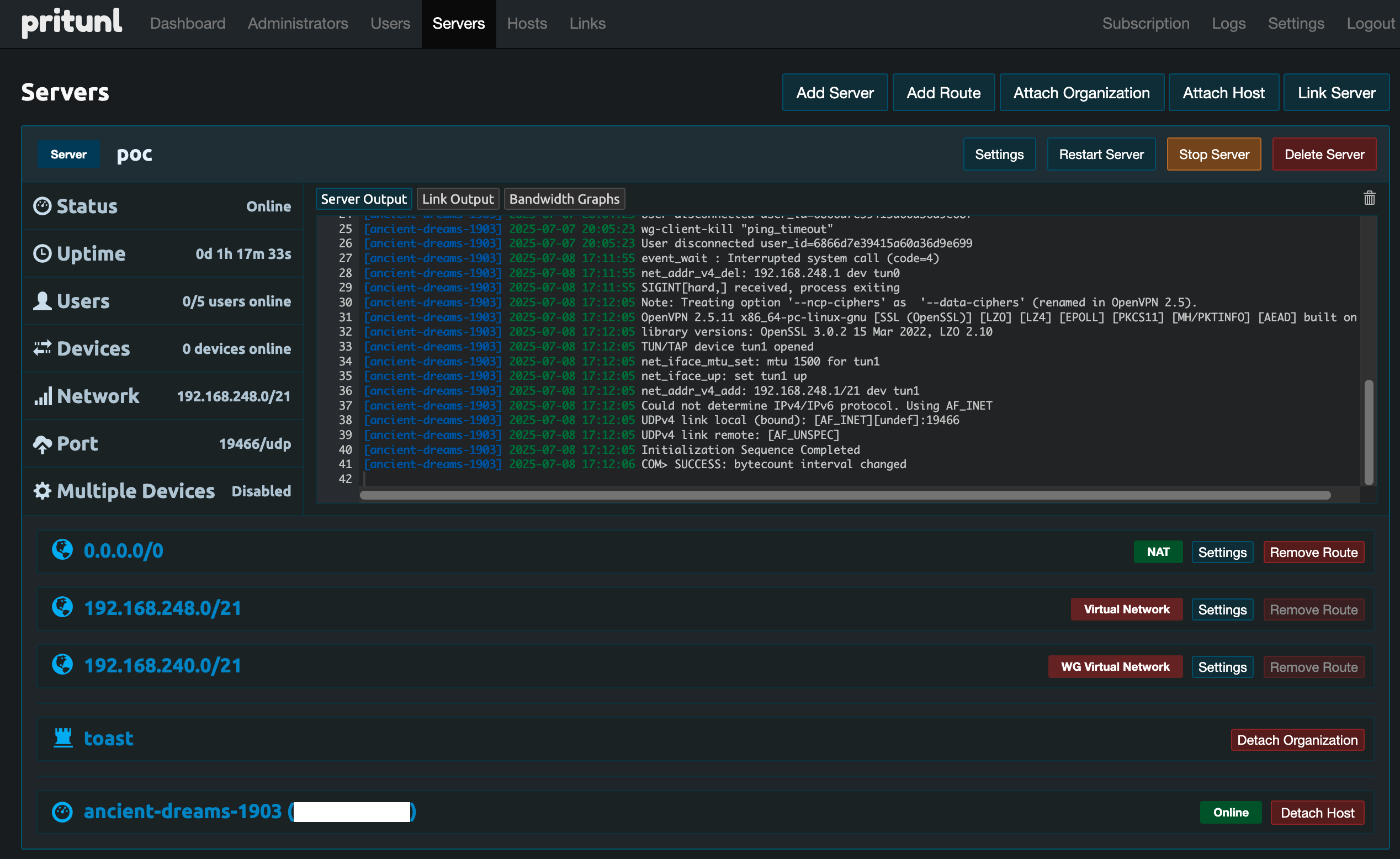
I’ve been working through a POC for an upgraded Pritunl on AWS EC2 instance(s) with MongoDB Atlas cloud database as a backend.
The acceptance criteria includes multiple HA Pritunl instances, public DNS for Pritunl and handoff to OKTA using groups to hand over the profiles used to connect, and restricting hardware to company-built laptops only. And switching from OpenVPN to Wireguard for the tunnel protocol.
In preparation for this I separated my Apple Studio desktop, on which I’ve always preferred to work, as it is stable, powerful as hell, and has (had) two Apply Studio Displays connected. To make this work, another post perhaps, I set up one of the Studio displays plus a (work) laptop stand. Thus work is over here (swivel the chair 180 degrees), and personal is here (return)…
The original vpn installation I am replacing is an older version of Pritunl, running as a set of tasks in AWS ECS (Elastic Container Service) with Pritunl running in docker, with a local mongodb install also running as a docker container and a hacked-together bind/DNS docker container service to tie it all together. None of this is adequately documented. All of it could use some improved design to make the next upgrade less arduous and allow OKTA authentication to provide fine grain controls. Placing mongodb in the cloud helps. Deploying Pritunl on EC2 rather than as a docker image also helps. Along with that I have a better network design overall.
The first step in this is a POC with a single instance of Pritunl on EC2, and an Atlas Mongodb backend, both instantiated through terraform as much as is possible.
I started this by working through a couple of existing Pritunl terraform modules, but quickly found they don’t handle multiple instances and do not provide enough flexibility and options to make them really create an advantage over just working through the terraform myself. Those initial attempts got checked into github and dropped aside.
By Hand Pieces, Prerequisites
I’m going to bring in the terraform code for Pritunl and for mongodb Atlas, but there are several pieces that have to be in place outside of the terraform that directly creates the infrastructure.
In mongodb Atlas
- create an organization
- attach a billing method (mongodbatlas terraform module, even when configured for the same parameters as the Atlas console ui for creating a free tier cluster, won’t do it)
- create a project
- as organization owner, create an api key and add your IP to the access list for the api key
- add your IP in the Network Access section of the project itself
- retrieve the organization ID by going to the top level organization page and copying the identifying string from the browser
- retrieve the project ID by going to the project page and copying the project ID from the browser
Organization ID example: https://cloud.mongodb.com/v2#/org/684ad8fd98e4207dfsre91/projects | 684ad8fd98e4207dfsre91
Project ID example: https://cloud.mongodb.com/v2/68655b85a1538e206d03452d#/overview | 68655b85a1538e206d03452d
Terraform ends up with a circular dependency. You must have a project with a network access allow for the IP from which you are applying terraform before you can create a project. You must have a project to which you can attach an access list before you can create an access list. And so on…
In AWS
- create public DNS zone for the Pritunl host to live in
- create a secretsmanager location to store
- api public key
- api private key (these come from the Atlas console within the organization)
- Pritunl database user name
- Pritunl database user password (create this with a password manager tool as a 32 character string)
- mongodb URI (this is not populated but created as a blank key)
- create a secretsmanager location to hold the Pritunl admin user credentials
- create a 32 character random string for the Pritunl admin user password. The username byt default is
pritunl. Populate the secretsmanager location.
I created two terraform environment-agnostic modules. The directory structure is something like
 1
 2
 3
 4
 5
 6
 7
 8
 9
10
11
12
13
14
15
16
17
18
19
20
21
22
23
24
25
26
27
28
29
30
31
32
33
34
35
| .
├── modules
│ ├── mongodb
│ │ ├── import_resources.tf
│ │ ├── inputs.tf
│ │ ├── mongodb_atlas.tf
│ │ ├── outputs.tf
│ │ └── provider.tf
│ ├── prerequisites
│ │ ├── atlas_api.tf
│ │ ├── inputs.tf
│ │ ├── pritunl_dns.tf
│ │ └── pritunl_secret.tf
│ └── pritunl_POC
│ ├── data.tf
│ ├── inputs.tf
│ ├── outputs.tf
│ ├── pritunl_instance_role.tf
│ ├── pritunl.tf
│ ├── provider.tf
│ ├── scripts
│ │ ├── pritunl_userdata_poc.sh.tpl
│ │ └── pritunl_userdata_prod.sh.tpl
├── nonprod_POC
│ ├── 00_data.tf
│ ├── 00_locals.tf
│ ├── 00_provider.tf
│ ├── errored.tfstate
│ ├── imports.tf
│ ├── main.tf
├── prereqs_nonprod_POC
│ ├── 00_data.tf
│ ├── 00_provider.tf
│ ├── main.tf
└── README.md
|
The mongodbatlas terraform module from mongodb instantiated a cluster. This module will work both for POC and for production work. The pritunl POC module only instantiates a single AWS EC2 instance with a public IP and public DNS, using Let’s Encrypt for the SSL certificate (Pritunl builds that in). The production version will instantiate mutliple Pritunl servers behind a Network Load Balancer, passing VPN traffic straight through. The details of that are still being worked through and will be finalized once I hand the POC version over to the team responsible for OKTA, and we discover what’s truly required.
prerequisites creates the two secretsmanager locations and the route53 DNS record required for the POC.
nonprod_POC instantiates the mongodb and the pritunl_POC modules.
prereqs_nonprod_POC does the same for the prerequsites module.
mongodb
import_resources.tf imports the resource that was created by hand that is needed for the mongodb cluster.
1
2
3
4
5
6
| # ---------- resources ---------- #
resource "mongodbatlas_project" "pritunl" {
name = var.project_name
org_id = var.mongodb_atlas_org_id
}
|
Originally I had this importing the local IP address added to the project in Network Access. The "mongodbatlas_project_ip_access_list resource you’ll see later seemed to encompass the whole list - it does not. It deals with each line as a separate entry, so the initial IP add can be ignored. But we do need the project and project ID.
provider.tf isn’t usually needed in an environment agnostic module - it’s needed here because without it terraform assumes the mongodbatlas module is in the hashicorp space
1
2
3
4
5
6
7
8
9
| # without this terraform assumes hashicopr as provider...
terraform {
required_providers {
mongodbatlas = {
source = "mongodb/mongodbatlas"
version = "~> 1.16.0"
}
}
}
|
outputs.tf gives us the pieces that are manipulated in nonprod_POC calling code.
1
2
3
4
5
6
7
8
9
| output "mongodb_srv_address" {
description = "Mongodb Atlas SRV connection address"
value = mongodbatlas_cluster.pritunl.srv_address
}
output "project_id" {
description = "MongoDB Atlas Project ID"
value = mongodbatlas_project.pritunl.id
}
|
inputs.tf defines what needs to be supplied to the mongodb module.
  1
  2
  3
  4
  5
  6
  7
  8
  9
 10
 11
 12
 13
 14
 15
 16
 17
 18
 19
 20
 21
 22
 23
 24
 25
 26
 27
 28
 29
 30
 31
 32
 33
 34
 35
 36
 37
 38
 39
 40
 41
 42
 43
 44
 45
 46
 47
 48
 49
 50
 51
 52
 53
 54
 55
 56
 57
 58
 59
 60
 61
 62
 63
 64
 65
 66
 67
 68
 69
 70
 71
 72
 73
 74
 75
 76
 77
 78
 79
 80
 81
 82
 83
 84
 85
 86
 87
 88
 89
 90
 91
 92
 93
 94
 95
 96
 97
 98
 99
100
101
102
103
104
105
106
107
108
109
110
111
112
113
114
| variable "mongodb_atlas_org_id" {
type = string
description = "This ID uniquely identifies the organization under which the Atlas project will be created"
}
variable "project_name" {
type = string
description = "name of the Atlas project"
}
variable "project_id" {
type = string
description = "Atlas-assigned project ID (visible in URL in Atlas console)"
}
# ---------- access credentials ---------- #
variable "mongodb_user_name" {
type = string
description = "Database user that your Pritunl instance will use to connect to MongoDB Atlas."
}
variable "mongodb_user_password" {
type = string
description = "Password for the user that your Pritunl instance will use to connect to MongoDB Atlas."
sensitive = true
}
variable "mongodb_public_key" {
type = string
description = "Mongodb Atlas API public key"
}
variable "mongodb_private_key" {
type = string
description = "Mongodb Atlas API private key"
}
# variable "vpn_access_cidr" {
# type = string
# description = "CIDR network allowed to access database"
# }
# these below have defaults
# ---------- inputs specific to mongodbatlas_cluster resource ---------- #
variable "cluster_name" {
type = string
description = "name parameter in mongodbatlas_cluster resource"
default = "pritunl-cluster"
}
variable "cluster_type" {
type = string
description = "cluster_type parameter in mongodbatlas_cluster resource"
default = "REPLICASET"
}
variable "provider_name" {
type = string
description = "provider_name parameter in mongodbatlas_cluster resource"
default = "AWS"
}
variable "backing_provider_name" {
type = string
description = "backing_provider_name in mongodbatlas_cluster resource"
default = "AWS"
}
variable "provider_region_name" {
type = string
description = "provider_region_name in mongodbatlas_cluster resource"
default = "US_EAST_1"
}
variable "provider_instance_size_name" {
type = string
description = "provider_instance_size_name parameter in mongodbatlas_cluster resource"
default = "M10"
}
variable "cloud_backup" {
type = bool
description = "cloud_backup parameter in mongodbatlas_cluster resoruce"
default = true
}
variable "auto_scaling_disk_gb_enabled" {
type = bool
description = "auto_scaling_disk_gb_enabled parameter in mongodbatlas_cluster resource"
default = true
}
# ---------- inputs specific to mongodbatlas_database_user resource ---------- #
variable "auth_database_name" {
type = string
description = "auth_database_name parameter in mongodbatlas_database_user resource"
default = "admin"
}
variable "roles_role_name" {
type = string
description = "roles.role_name parameter in mongodbatlas_database_user resource"
default = "readWrite"
}
variable "roles_database_name" {
type = string
description = "roles.database_name in mongodbatlas_database_user resource"
default = "pritunl"
}
|
mongodbatlas.tf instantiates the mongodb Atlas cluster
 1
 2
 3
 4
 5
 6
 7
 8
 9
10
11
12
13
14
15
16
17
18
19
20
21
22
23
24
25
26
27
28
29
30
31
32
33
34
35
36
37
38
39
40
41
42
43
44
45
46
47
48
49
50
51
52
53
54
55
56
57
58
59
60
61
62
63
64
65
66
67
| # create:
# org ID
# project, then go to project and retrieve the project_id
# add terraform host to access list
# these resources are imported in import_resources.terraform
# then the calling code does something like
# # ---------- import ---------- #
# # NOTE: these must be literal values, so they will have to be constructed here from values in the Atlas console
# # Import the project resource
# import {
# id = "project ID string"
# to = module.mongodb.mongodbatlas_project.pritunl
# }
# ---------- cluster and user/role ---------- #
# MongoDB Atlas Cluster
resource "mongodbatlas_cluster" "pritunl" {
project_id = mongodbatlas_project.pritunl.id
name = var.cluster_name
cluster_type = var.cluster_type
provider_name = var.provider_name
backing_provider_name = var.backing_provider_name
provider_region_name = var.provider_region_name
provider_instance_size_name = var.provider_instance_size_name
cloud_backup = var.cloud_backup
auto_scaling_disk_gb_enabled = var.auto_scaling_disk_gb_enabled
}
# # MongoDB Atlas Database User
# resource "mongodbatlas_database_user" "pritunl_user" {
# username = var.mongodb_user_name
# password = var.mongodb_user_password
# project_id = mongodbatlas_project.pritunl.id
# auth_database_name = var.auth_database_name
# roles {
# role_name = var.roles_role_name
# database_name = var.roles_database_name
# }
# }
resource "mongodbatlas_database_user" "pritunl_user" {
username = var.mongodb_user_name
password = var.mongodb_user_password
project_id = mongodbatlas_project.pritunl.id
auth_database_name = var.auth_database_name
roles {
role_name = var.roles_role_name
database_name = var.roles_database_name
}
roles {
role_name = "readWriteAnyDatabase"
database_name = "admin"
}
roles {
role_name = "dbAdminAnyDatabase"
database_name = "admin"
}
}
|
Note that the restricted role (not admin) for the database user will be placed after Pritunl in brought up and configured and we have added the Pritunl API key to the database directly. The user requires these permissions initially to allow this, at least for debugging. At one point I had the user delete the mongodb database in order to re-run the Pritunl setup and document it. Thatr database drop required these permissions, but they are not permanent and should not be left in place.
pritunl POC
00_data.tf
 1
 2
 3
 4
 5
 6
 7
 8
 9
10
11
12
13
14
15
| data "aws_ami" "ubuntu" {
most_recent = true
filter {
name = "name"
values = ["ubuntu/images/hvm-ssd/ubuntu-jammy-22.04-amd64-server-*"]
}
filter {
name = "virtualization-type"
values = ["hvm"]
}
owners = ["099720109477"] # Canonical
}
|
This brings in the current Ubuntu 22.04 AMI id.
00_inputs.tf
POC variable was to plot paths between a single instance of pritunl (POC) and mutiples behind an NLB for a production HA setup.
This was dropped and the pritunl_POC module (which is wholly POC, single instance) crafted instead.
 1
 2
 3
 4
 5
 6
 7
 8
 9
10
11
12
13
14
15
16
17
18
19
20
21
22
23
24
25
26
27
28
29
30
31
32
33
34
35
36
37
38
39
40
41
42
43
44
45
46
47
48
49
50
51
52
53
54
55
56
57
58
59
60
61
62
63
64
65
66
67
68
69
70
71
72
73
74
75
76
77
78
79
80
81
82
83
84
85
86
87
88
89
90
91
92
93
94
95
96
97
| # --------------------------
# POC or prod?
# --------------------------
variable "POC" {
type = bool
description = "POC true means single pritunl instance | POC false is nlb, multiple pritunl"
}
# --------------------------
# AWS Region
# --------------------------
variable "aws_region" {
description = "AWS region to deploy into"
type = string
default = "us-east-1"
}
# --------------------------
# VPC & Subnet IDs
# --------------------------
variable "vpc_id" {
description = "VPC ID for all resources"
type = string
}
variable "subnet_ids" {
description = "List of public subnet IDs in at least 2 AZs"
type = list(string)
}
# --------------------------
# VPN Infrastructure
# --------------------------
variable "vpn_domain" {
description = "VPN domain name (e.g., vpn.example.com)"
type = string
}
variable "vpn_instance_count" {
description = "Number of Pritunl EC2 instances to launch"
type = number
default = 1
validation {
condition = var.vpn_instance_count >= 1
error_message = "vpn_instance_count must be at least 1."
}
}
# --------------------------
# DNS / Route53
# --------------------------
variable "zone_id" {
description = "Route53 Hosted Zone ID"
type = string
}
# --------------------------
# MongoDB Atlas
# --------------------------
variable "mongodb_atlas_org_id" {
description = "MongoDB Atlas Organization ID"
type = string
}
variable "mongodb_uri" {
type = string
description = "URI passed to pritunl module for use in userdata template(s)"
}
variable "vpn_access_cidr" {
description = "CIDR block to allow into MongoDB Atlas cluster (e.g., EC2 EIP, NAT gateway)"
type = string
default = "0.0.0.0/0"
}
variable "mongodb_project_id" {
type = string
description = "project ID output from mongodb used to update access IPlist"
}
|
These would be the environment-specific values to be passed by the calling code.
00_outputs.tf
1
2
3
4
5
6
7
8
| output "instance_public_ip" {
description = "Public IP of the single POC Pritunl EC2 instance"
value = aws_instance.pritunl.public_ip
}
output "instance_id" {
value = aws_instance.pritunl.id # If you need the instance ID instead
}
|
These would be used by the calling code to place the pritunl instance IP address in the Network Allow list for the project in which the mongodb cluster is brought up.
pritunl_instance_role.tf
 1
 2
 3
 4
 5
 6
 7
 8
 9
10
11
12
13
14
15
16
17
18
19
20
21
22
23
24
25
26
27
28
29
30
31
32
33
34
35
36
37
38
39
40
41
42
43
44
45
46
47
| # Only create when in POC mode
resource "aws_iam_role" "pritunl_dns_certbot" {
count = var.POC ? 1 : 0
name = "pritunl-certbot-route53"
assume_role_policy = jsonencode({
Version = "2012-10-17",
Statement = [{
Effect = "Allow",
Principal = {
Service = "ec2.amazonaws.com"
},
Action = "sts:AssumeRole"
}]
})
}
resource "aws_iam_policy" "pritunl_dns_certbot_policy" {
count = var.POC ? 1 : 0
name = "pritunl-certbot-route53-policy"
policy = jsonencode({
Version = "2012-10-17",
Statement = [
{
Effect = "Allow",
Action = [
"route53:ListHostedZones",
"route53:ListResourceRecordSets",
"route53:ChangeResourceRecordSets"
],
Resource = "*"
}
]
})
}
resource "aws_iam_role_policy_attachment" "pritunl_dns_certbot_attach" {
count = var.POC ? 1 : 0
role = aws_iam_role.pritunl_dns_certbot[0].name
policy_arn = aws_iam_policy.pritunl_dns_certbot_policy[0].arn
}
resource "aws_iam_instance_profile" "pritunl_dns_certbot_profile" {
count = var.POC ? 1 : 0
name = "pritunl-certbot-profile"
role = aws_iam_role.pritunl_dns_certbot[0].name
}
|
This allows access to route53 to do the Certbot DNS verify, though I think pritunl just did the pritunl local validation using port 80-, and this was not used.
pritunl.tf
  1
  2
  3
  4
  5
  6
  7
  8
  9
 10
 11
 12
 13
 14
 15
 16
 17
 18
 19
 20
 21
 22
 23
 24
 25
 26
 27
 28
 29
 30
 31
 32
 33
 34
 35
 36
 37
 38
 39
 40
 41
 42
 43
 44
 45
 46
 47
 48
 49
 50
 51
 52
 53
 54
 55
 56
 57
 58
 59
 60
 61
 62
 63
 64
 65
 66
 67
 68
 69
 70
 71
 72
 73
 74
 75
 76
 77
 78
 79
 80
 81
 82
 83
 84
 85
 86
 87
 88
 89
 90
 91
 92
 93
 94
 95
 96
 97
 98
 99
100
101
102
103
104
105
106
107
108
109
110
111
112
113
114
115
116
117
118
119
120
121
122
123
124
125
126
127
128
129
130
131
132
133
134
135
136
137
| # --------------------------
# locals
# --------------------------
locals {
pritunl_userdata_poc = templatefile("${path.module}/scripts/pritunl_userdata_poc.sh.tpl", {
mongodb_uri = var.mongodb_uri
vpn_domain = var.vpn_domain
aws_region = var.aws_region
})
}
# --------------------------
# Security Groups
# --------------------------
resource "aws_security_group" "pritunl" {
name = "pritunl-vpn"
vpc_id = var.vpc_id
ingress {
description = "Allow HTTPS for VPN & UI"
from_port = 443
to_port = 443
protocol = "tcp"
cidr_blocks = ["0.0.0.0/0"]
}
ingress {
description = "OpenVPN/WireGuard TCP"
from_port = 1194
to_port = 1200
protocol = "tcp"
cidr_blocks = ["0.0.0.0/0"]
}
ingress {
description = "OpenVPN/WireGuard UDP"
from_port = 1194
to_port = 1200
protocol = "udp"
cidr_blocks = ["0.0.0.0/0"]
}
ingress {
description = "Allow WireGuard UDP"
from_port = 51820
to_port = 51820
protocol = "udp"
cidr_blocks = ["0.0.0.0/0"]
}
ingress {
description = "Allow SSH for debugging"
from_port = 22
to_port = 22
protocol = "tcp"
cidr_blocks = ["local_ip_only"]
}
ingress {
description = "Allow HTTP for Lets Encrypt validation"
from_port = 80
to_port = 80
protocol = "tcp"
cidr_blocks = ["0.0.0.0/0"]
}
egress {
from_port = 0
to_port = 0
protocol = "-1"
cidr_blocks = ["0.0.0.0/0"]
}
}
# --------------------------
# Launch Pritunl EC2 Instance
# --------------------------
resource "aws_instance" "pritunl" {
ami = data.aws_ami.ubuntu.id
instance_type = "t3.medium"
subnet_id = element(var.subnet_ids, 0)
associate_public_ip_address = true
vpc_security_group_ids = [aws_security_group.pritunl.id]
iam_instance_profile = aws_iam_instance_profile.pritunl_dns_certbot_profile[0].name
key_name = "your key pair name"
user_data = local.pritunl_userdata_poc
tags = {
Name = "pritunl-poc"
}
}
# --------------------------
# MongoDB Atlas IP Access List (Allow Access from Pritunl Instance)
# --------------------------
resource "mongodbatlas_project_ip_access_list" "pritunl_ip" {
project_id = var.mongodb_project_id # Reference the project declared here
ip_address = aws_instance.pritunl.public_ip # Get the public IP of the EC2 instance
comment = "IP address for pritunl access"
}
# --------------------------
# CloudWatch Log Group
# --------------------------
resource "aws_cloudwatch_log_group" "pritunl" {
name = "/pritunl/vpn"
retention_in_days = 30
}
# --------------------------
# Create Let's Encrypt domain name
# --------------------------
resource "aws_route53_record" "pritunl_poc_dns" {
zone_id = var.zone_id # The hosted zone ID for nonprod.vpn.toasttab.com
name = "poc"
type = "A"
ttl = 300
records = [aws_instance.pritunl.public_ip]
}
|
provider.tf
1
2
3
4
5
6
7
8
| terraform {
required_providers {
mongodbatlas = {
source = "mongodb/mongodbatlas"
version = "~> 1.16.0"
}
}
}
|
This ensures any mongodbatlas module calls go to mongodb rather than hashicorp..
./terraformw init
./terraform plan -out=tf.plan
./terraformw apply tf.plan
initial pritunl setup
Once this was in place, and pritunl connected to through the public IP address, you do the initial pritunl setup
FQDN for pritunl server must be resolvable in public DNS
…for Let’s Encrypt built into pritunl to validate and install certificate.
1
| dig <fully_qualified_domain_name>
|
create a password for pritunl user and populate the secretsmanager secret
Use a password create tool and create a 32 character password for the pritunl user. Update the secretsmanager location secret.
connect to pritunl server by IP address and setup
Connect to https://<pritunl server IP address>
You’ll get this screen.
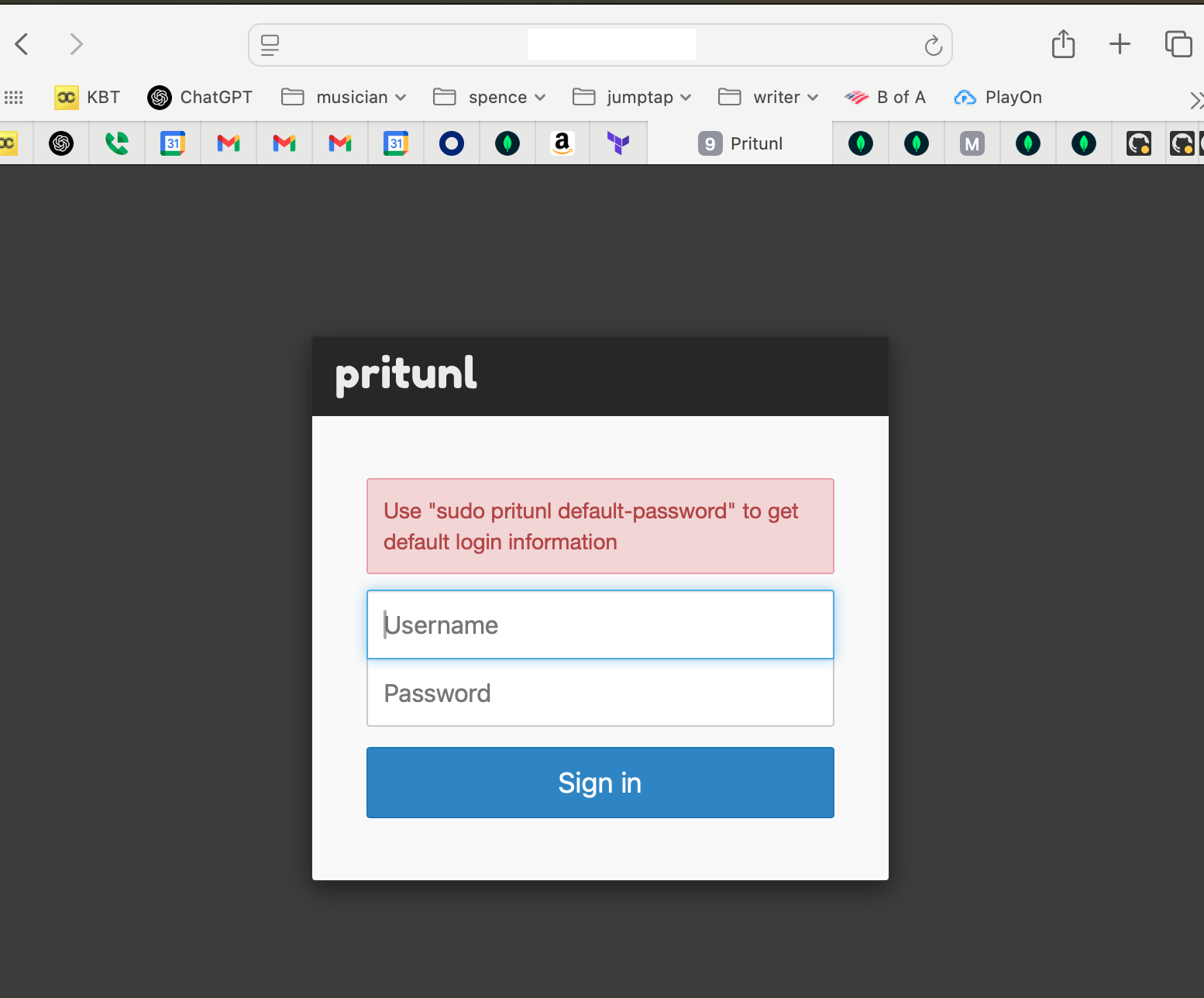
Log into the EC2 instance using the key pair you configured for thew instance and run the command sudo pritunl default-password
1
2
3
4
5
| [local][2025-07-03 19:19:31,235][INFO] Getting default administrator password
Administrator default password:
username: "pritunl"
password: "random password string from pritunl"
ubuntu@ip-10-42-0-11:~$
|
Use this username and password to log in to the pritunl server.
You’ll get this setup screen next.
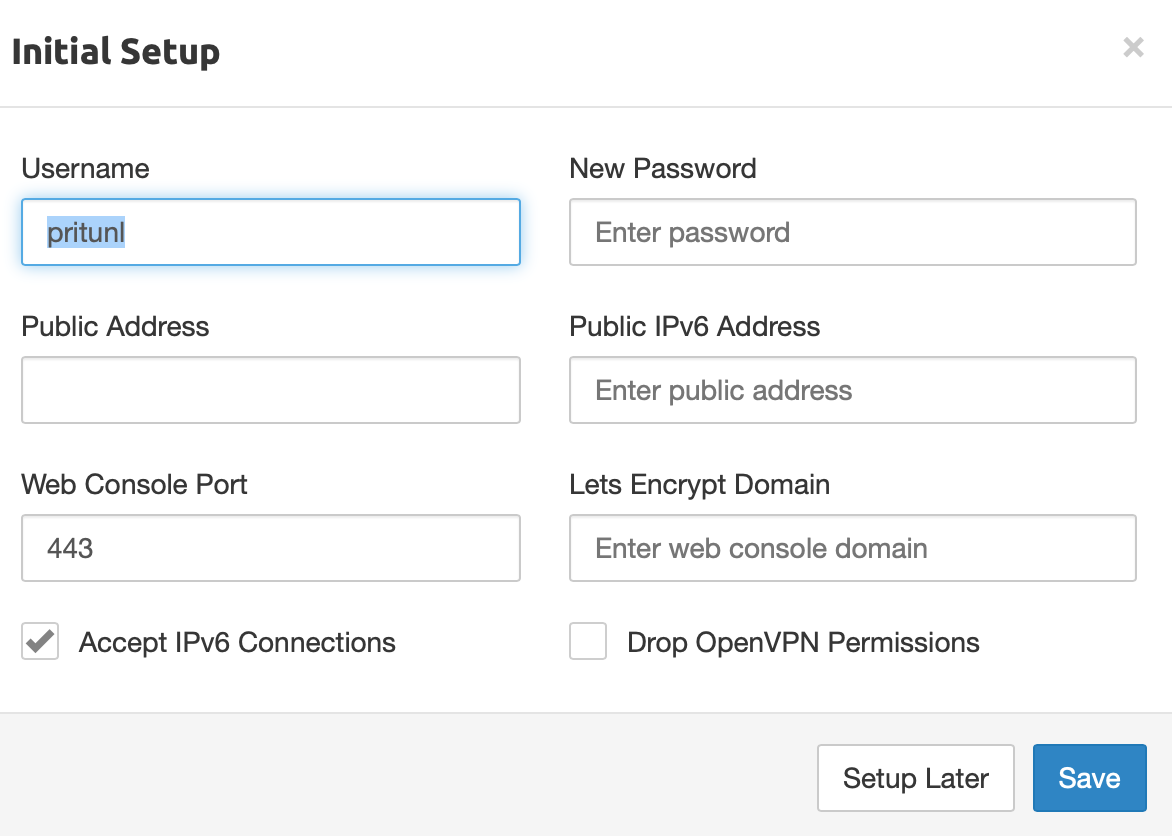
Place the password from the pritunl admin user secret here, and the fully-qualified doman name for the pritunl server for Let’s Encrypt
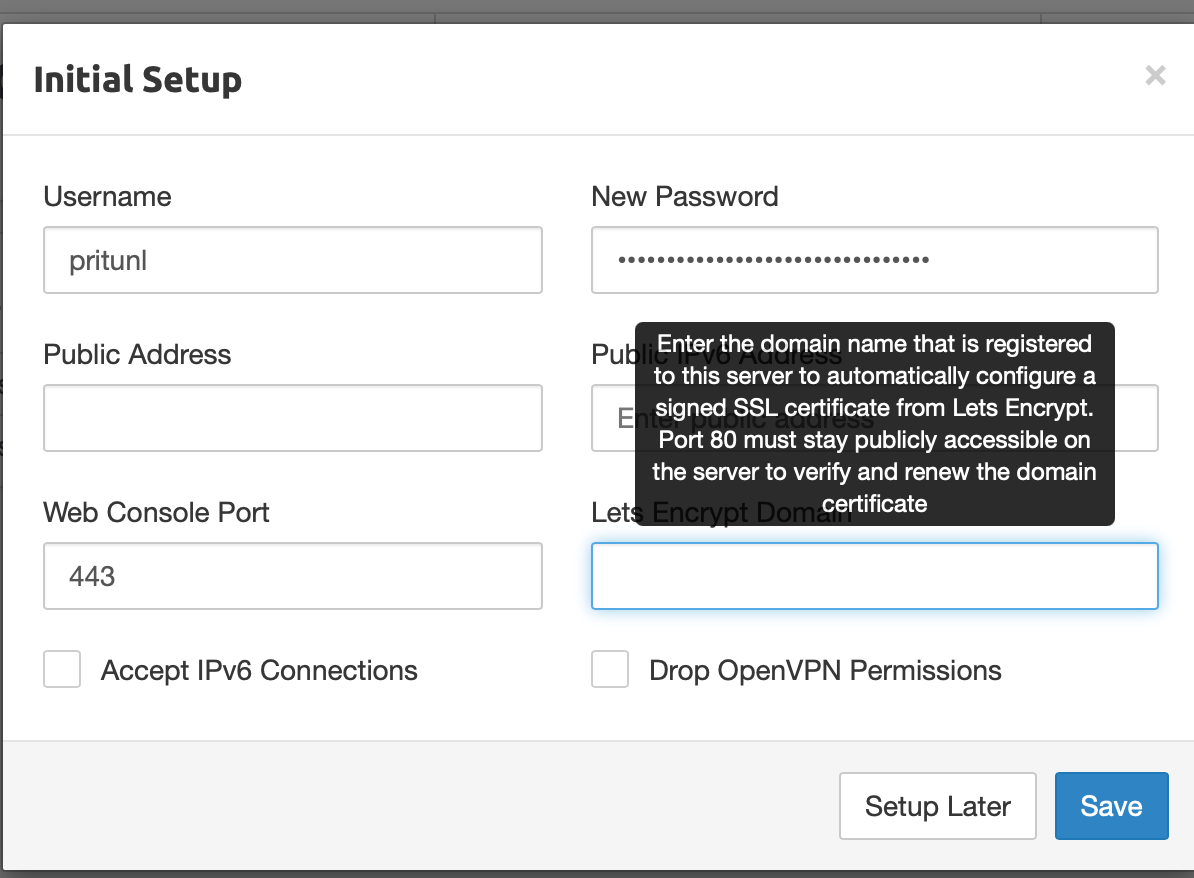
Click Save
Log back in to the pritunl server at https://your_domain_name/login (fully qualified domain name) instead of IP address
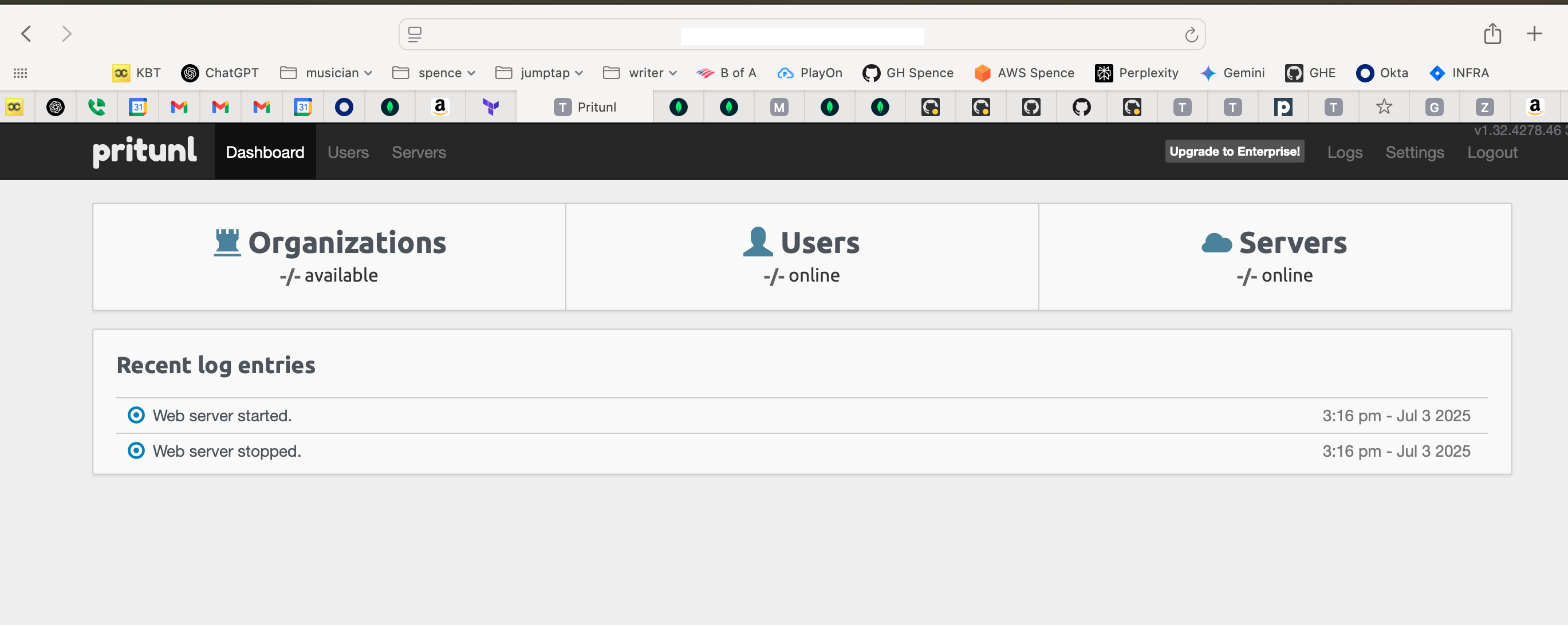
From here I’m setting up terraform to use a pritunl admin api key and configure organizations, servers, users and routes through terraform code.
—doug