
Pritunl API, Secrets and Tokens and Keys

Wednesday, Jul 9, 2025 | 10 minute read | Updated at Wednesday, Jul 9, 2025

Doug Munsinger

Working through Pritunl 1.32 API changes…
Egyptian Corner


I stood up the infrastructure for an upgraded Pritunl Proof-of-Concept (POC) with a Mongodb Atlas database backend using Terraform. The next steps for the POC were split. The team responsible for managing OKTA would configure SAML 2.0 authentication, and I would sort out configuring Pritunl organizations, users, servers and routes via Terraform.

The POC runs the latest version at the time of writing, v1.32.4278.46 3b595f. When I began exploring the API integration, API keys, tokens and secrets, I found much of the functionality - including access to the API and SAML configuration - is gated behind the Enterprise license.

To proceed, I needed to retrieve the existing Pritunl enterprise key from our production Pritunl service.

The production install of Pritunl runs on an AWS ECS cluster backed by EC2 instances. I used the .pem SSH key, logged in to one of the EC2 instances backing the cluster, and accessed the Docker container with:

1
2
docker exec -it <container name> /bin/bash
pritunl get app.license

Once I applied the Enterprise license key, SAML configuration became available immediately. The API panel under the admin users was not available.

Installing the Enterprise license in Pritunl does not immediately enable the API access checkbox or reveal the API token and secret in the admin UI. In the Pritunl formus, Admins have reported that after applying the license, the API panel remains hidden until the server is restarted or the service is reloaded.

Nothing in the forum indicates a delay due to caching or time — the consensus is that a proper restart of the Pritunl process/service is required for the UI to reflect the license change (the license enables the feature, but the UI only exposes it after restart)

So to trigger the API panel UI:

  • Apply the Enterprise license (e.g., via docker exec … pritunl set app.license …).
  • Restart the Pritunl server/service or container.
  • Then visit Admin → Users again, and the API toggle plus generated token/secret fields will appear in the admin user settings.

API Auth: Session vs HMAC

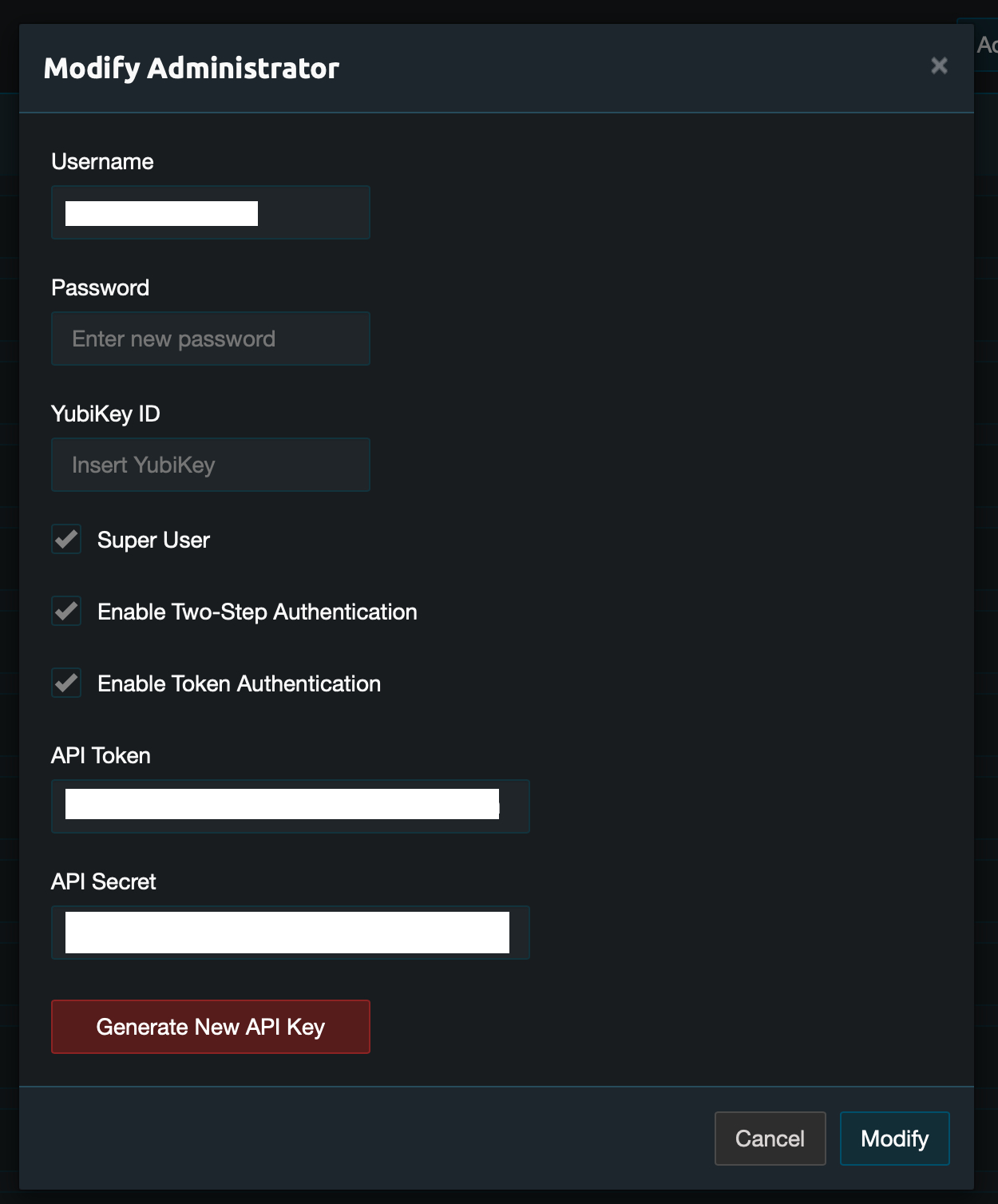
Once the Enterprise key is loaded into Pritunl, in the settings for an admin user is a checkbox allowing API authentication, and the token and secret are visible.
Pritunl API Old

When I initially applied the Enterprise license without restarting Pritunl, the API panel under admin users seemed to be missing. I started exploring how authentication worked against the API and looked at scripting a method to interact with the API with the assumption that that panel was now gone from Pritunl. Note: that’s actually not the case, the panel is visible in the UI under admin user settings after the Pritunl service is restarted.

My first attempt at scripting API access used browser-style session authentication. The Go script logged in, received a session cookie, and attempted to make authenticated requests using the cookie. It failed consistently with 401 Unauthorized.

 1
 2
 3
 4
 5
 6
 7
 8
 9
10
11
12
13
14
15
16
17
18
Login successful. Cookies set for origin: [session=.eJwtzV2
vwTAYAOD_0lsSnbVbSVwIYUt75miGxY28tKN2Oh-tyJn470jcP8nzQK
CsqTdGoT6KWKRIqUiPBBQiDGGk1JZhQG3ktHPm9HV3zzU5X5KDnv_gafbv
J_JqV3ZqIFvQ5m_78WZfg79d9Zs3Yih_-WER57xwVYjnraVMe7m6yJSE
ZRJwYfIRXbtKVJLdKh03O9Cd40zMVsu7k4DTSdKRRanGhTkJtq6zhIvhYP
BuvLHaebBn1A9i2sWsi2n4fAF_PUOy.aG6mhQ.Cbjl4K5KDjkO733ZR
12QYPtkzbg]
Requesting https://pritunl/organization with cookies: 
[session=.eJwtzV2vwTAYAOD_0lsSnbVbSVw
IYUt75miGxY28tKN2Oh-tyJn470jcP8nzQKCsqTdGoT6KWKRIqUiPBBQiDGGk
1JZhQG3ktHPm9HV3zzU5X5KDnv_gafbvJ_JqV3ZqIFvQ5m_78WZfg79d9Zs3Yi
h_-WER57xwVYjnraVMe7m6yJSEZRJwYfIRXbtKVJLdKh03O9Cd40zMVsu7k4D
TSdKRRanGhTktq6zhIvhYPBuvLHaebBn1A9i2sWsi2n4fAF_PUOy.aG6mhQ.
Cbjl4K5KDjkO733ZR12QYPtkzbg]
Failed to fetch organizations: non-200 response from 
https://pritunl/organization: 401 Unauthorized
401: Unauthorized
exit status 1

That result proved session cookie auth was not going to work.

Working Approach: HMAC Auth in Go

From zach (creator of Pritunl).

1
2
3
4
5
6
7
8
9
zach
May 30

It’s HMAC-SHA256 authentication, there is an example of this being done 
in pritunl/tools/add_aws_ranges.py. To find API usage use Chrome Developer 
Tools, it is import when sending PUT requests that all fields from the 
GET are included. If there are issues with 401 errors set auditing mode 
to all in the top right settings than watch /var/log/pritunl_journal.log. 
This log will report the causes of 401 errors.

That thread points to this python code , which implements HMAC-based API authentication using a custom signature scheme.

After studying the Python code, I asked ChatGPT to help rewrite my Go script using the HMAC signature pattern. The resulting script calculates the signature from:

  • The token
  • A Unix timestamp
  • A random nonce
  • The HTTP method and path

Then it sends the request with four headers: Auth-Token, Auth-Timestamp, Auth-Nonce, and Auth-Signature.

The script pulls these values from CLI flags, environment variables, or AWS Secrets Manager and uses them to query the Pritunl API.

This script:

  1
  2
  3
  4
  5
  6
  7
  8
  9
 10
 11
 12
 13
 14
 15
 16
 17
 18
 19
 20
 21
 22
 23
 24
 25
 26
 27
 28
 29
 30
 31
 32
 33
 34
 35
 36
 37
 38
 39
 40
 41
 42
 43
 44
 45
 46
 47
 48
 49
 50
 51
 52
 53
 54
 55
 56
 57
 58
 59
 60
 61
 62
 63
 64
 65
 66
 67
 68
 69
 70
 71
 72
 73
 74
 75
 76
 77
 78
 79
 80
 81
 82
 83
 84
 85
 86
 87
 88
 89
 90
 91
 92
 93
 94
 95
 96
 97
 98
 99
100
101
102
103
104
105
106
107
108
109
110
111
112
113
114
115
116
117
118
119
120
121
122
123
124
125
126
127
128
129
130
131
132
133
134
135
136
137
138
139
140
141
142
143
144
145
146
147
148
149
150
151
152
153
154
155
156
157
158
159
160
161
162
163
164
165
166
167
168
169
170
171
172
173
174
175
176
177
178
179
180
181
182
183
184
185
186
187
188
189
190
191
192
193
194
195
196
197
198
199
200
201
202
203
204
205
206
207
208
209
210
211
212
213
214
215
216
217
218
spence:pritunl_config_exporter dsm$ cat pritunl_config_exporter.go
package main

import (
	"crypto/hmac"
	"crypto/sha256"
	"encoding/base64"
	"encoding/json"
	"flag"
	"fmt"
	"io"
	"math/rand"
	"net/http"
	"os"
	"strings"
	"time"

	"github.com/aws/aws-sdk-go/aws"
	"github.com/aws/aws-sdk-go/aws/session"
	"github.com/aws/aws-sdk-go/service/secretsmanager"
)

type Config struct {
	Organizations []Organization `json:"organizations"`
	Servers       []Server       `json:"servers"`
}

type Organization struct {
	ID    string `json:"id"`
	Name  string `json:"name"`
	Users []User `json:"users"`
}

type User struct {
	ID    string `json:"id"`
	Name  string `json:"name"`
	Email string `json:"email"`
}

type Server struct {
	ID     string  `json:"id"`
	Name   string  `json:"name"`
	Port   int     `json:"port"`
	Routes []Route `json:"routes"`
}

type Route struct {
	ID      string `json:"id"`
	Network string `json:"network"`
	Nat     bool   `json:"nat"`
}

func usage() {
	fmt.Println("\nAWS Secrets Manager secret JSON example:")
	fmt.Println(`{
  "PRITUNL_URL": "https://vpn.example.com",
  "PRITUNL_ADMIN_TOKEN": "Hv2FxEMoa3moTVuRahMsMK3VUCwdmjmt",
  "PRITUNL_ADMIN_SECRET": "zihea5hTIpIgxsPFboby4hctopxWQSKd"
}`)
	fmt.Println("\nUsage:")
	fmt.Println("  go run pritunl_config_exporter.go [-f output.json] [-u url] [-t token] [-s secret] [-o aws-secret-id]")
	fmt.Println("  Values are sourced in priority order: CLI flags > AWS SecretsManager (if -o) > environment variables")
	os.Exit(1)
}

func getSecretFromAWS(secretName string) (map[string]string, error) {
	sess := session.Must(session.NewSession())
	svc := secretsmanager.New(sess)

	result, err := svc.GetSecretValue(&secretsmanager.GetSecretValueInput{
		SecretId: aws.String(secretName),
	})
	if err != nil {
		return nil, err
	}
	sm := make(map[string]string)
	err = json.Unmarshal([]byte(*result.SecretString), &sm)
	return sm, err
}

func fallback(key, cliVal string, secrets map[string]string, env string) (string, error) {
	if cliVal != "" {
		return cliVal, nil
	}
	if v, ok := secrets[key]; ok && v != "" {
		return v, nil
	}
	if v := os.Getenv(env); v != "" {
		return v, nil
	}
	return "", fmt.Errorf("missing required credential: %s", key)
}

func hmacHeaders(token, secret string, method, path string) map[string]string {
	ts := fmt.Sprintf("%d", time.Now().Unix())
	nonce := fmt.Sprintf("%x", rand.Uint64())
	signStr := strings.Join([]string{token, ts, nonce, strings.ToUpper(method), path}, "&")
	mac := hmac.New(sha256.New, []byte(secret))
	mac.Write([]byte(signStr))
	sig := base64.StdEncoding.EncodeToString(mac.Sum(nil))

	return map[string]string{
		"Auth-Token":     token,
		"Auth-Timestamp": ts,
		"Auth-Nonce":     nonce,
		"Auth-Signature": sig,
	}
}

func authRequest(client *http.Client, token, secret, method, baseURL, path string, body io.Reader, v interface{}) error {
	url := baseURL + path
	req, err := http.NewRequest(method, url, body)
	if err != nil {
		return err
	}
	for k, v := range hmacHeaders(token, secret, method, path) {
		req.Header.Set(k, v)
	}
	if body != nil {
		req.Header.Set("Content-Type", "application/json")
	}
	resp, err := client.Do(req)
	if err != nil {
		return err
	}
	defer resp.Body.Close()
	if resp.StatusCode != http.StatusOK {
		b, _ := io.ReadAll(resp.Body)
		return fmt.Errorf("%s %s → %d %s\n%s", method, path, resp.StatusCode, resp.Status, string(b))
	}
	if v != nil {
		return json.NewDecoder(resp.Body).Decode(v)
	}
	return nil
}

func main() {
	outFile := flag.String("f", "", "Optional output file for config JSON")
	url := flag.String("u", "", "Pritunl URL")
	tokenCli := flag.String("t", "", "Admin API token")
	secretCli := flag.String("s", "", "Admin API secret")
	awsID := flag.String("o", "", "AWS SecretsManager secret ID")
	flag.Usage = usage
	flag.Parse()

	secretsMap := map[string]string{}
	if *awsID != "" {
		sm, err := getSecretFromAWS(*awsID)
		if err != nil {
			fmt.Printf("Error loading AWS secret: %v\n", err)
			usage()
		}
		secretsMap = sm
	}

	baseURL, err := fallback("PRITUNL_URL", *url, secretsMap, "PRITUNL_URL")
	if err != nil {
		fmt.Println(err)
		usage()
	}
	token, err := fallback("PRITUNL_ADMIN_TOKEN", *tokenCli, secretsMap, "PRITUNL_ADMIN_TOKEN")
	if err != nil {
		fmt.Println(err)
		usage()
	}
	secret, err := fallback("PRITUNL_ADMIN_SECRET", *secretCli, secretsMap, "PRITUNL_ADMIN_SECRET")
	if err != nil {
		fmt.Println(err)
		usage()
	}

	client := &http.Client{Timeout: 10 * time.Second}
	cfg := Config{}

	var orgs []Organization
	if err := authRequest(client, token, secret, "GET", baseURL, "/organization", nil, &orgs); err != nil {
		fmt.Printf("ERROR fetching organizations: %v\n", err)
		os.Exit(1)
	}
	for i, org := range orgs {
		var users []User
		p := fmt.Sprintf("/user/%s", org.ID)
		if err := authRequest(client, token, secret, "GET", baseURL, p, nil, &users); err != nil {
			fmt.Printf("ERROR fetching users for org %s: %v\n", org.Name, err)
			os.Exit(1)
		}
		orgs[i].Users = users
	}
	cfg.Organizations = orgs

	var servers []Server
	if err := authRequest(client, token, secret, "GET", baseURL, "/server", nil, &servers); err != nil {
		fmt.Printf("ERROR fetching servers: %v\n", err)
		os.Exit(1)
	}
	for i, srv := range servers {
		var routes []Route
		p := fmt.Sprintf("/server/%s/route", srv.ID)
		if err := authRequest(client, token, secret, "GET", baseURL, p, nil, &routes); err != nil {
			fmt.Printf("ERROR fetching routes for server %s: %v\n", srv.Name, err)
			os.Exit(1)
		}
		servers[i].Routes = routes
	}
	cfg.Servers = servers

	out, _ := json.MarshalIndent(cfg, "", "  ")
	if *outFile != "" {
		if err := os.WriteFile(*outFile, out, 0644); err != nil {
			fmt.Printf("Failed writing file: %v\n", err)
			os.Exit(1)
		}
		fmt.Printf("Config written to %s\n", *outFile)
	} else {
		fmt.Println(string(out))
	}
}
spence:pritunl_config_exporter dsm$

…was able to authenticate and create a json representation of the Pritunl configuration.

Terraform Compatibility

This Pritunl Terraform module , specifically this line of code. :

1
nonceMac := hmac.New(md5.New, []byte(t.apiSecret))

show that this module should work using the token and secret as auth. The line suggests that the provider does implement HMAC-based request signing, albeit using MD5 as the hash function (which is surprising — Pritunl’s current code uses HMAC-SHA256). This may indicate either compatibility with older versions or a custom implementation.

Getting the API Token and Secret

I found you could see the admin user token adn secret directly in the mongodb database, even if the Pritunl API did not expose it. I believe it is actually present under the hood, and then the Enterprise key makes it visible in the UI, but I have not confirmed that to be the case.

You log into the mongodb database using mongosh:

1
ubuntu@ip-10-100-10-2:~$ mongosh mongodb+srv://pritunl_user:pritunl_password@pritunl-cluster.mongodb.net/pritunl

Query the administrators collection:

1
db.administrators.find({ username: "admin_user" }).pretty()

Look for:

1
2
3
4
5
6
  {
    auth_api: true,
    secret: 'api_secret_string',
    token: 'api_token_string',
  }
]

From here, you use the token value as the api token, the secret value as the api secret, and if auth_api is true, the go code above will run through the internal config and assemble it as a json object.

Terraform

With the token and secret retrieved from MongoDB, and a working HMAC authentication implementation validated in Go, the next step is testing whether the Terraform provider can authenticate and apply changes using the same credentials.

Verified - the disc/pritunl module does work with those embedded API token and secret strings.

It turns out the OKTA SAML 2.0 integration we’ve configured creates and populates users on the fly. We won’t use terraform at all for users, and only for servers and organizations and routes. At this point the initial POC is done.

—doug

© 2025 by Doug Munsinger

About Me

About Cover

I build tools. I write scripts, plugins, compiled Go code binaries, terraform .tf files, APIs, hacks (a lot of these…). Glue that makes automation happen by connecting together open source projects like terraform, ansible packer, Jenkins, Docker, Kubernetes, Github and so on.

I do a lot of note taking and documentation. Mostly this is to let me pick back up where I left off on code or infrastructure when it has issues or needs to be upgraded or replaced a year or two down the road. Some of those notes & docs might be useful to someone other than myself. If that might be the case, they go here.

intuitive engineering describes taking physical structure and system design out of the lego or erector set viewpoint — where you piece things together one-by-one — and into an understanding of the art of engineering.

Watch really complex systems, say a network, for awhile and you find unexpected interactions become normal as complexity increases. The same is true for CICD systems and Devops/Infrastructure Engineering tools. There are gremlins in the dark corners.

Totems:

  • Avoid wherever possible, complexity, and where you find complexity, work toward a simpler design as a goal.
  • The elegant, aesthetically pleasing solution is also in most cases the least effort and personnel to support in the long run.
  • Expect and deal with missteps as they show up – complex designs can present opportunities as you work through them that are NOT visible at the start of the project. This is true in building construction. It is also true in network and system design, in software design.
  • Make that discovery part of the process, take advantage of those simplified and elegant changes as they present themselves.
  • Look for the consequences several steps ahead for each decision.
    • How locked into a design does it make you?
    • Can you live with that?
    • Is there a less restrictive/simpler/better/more elegant decision in design that can be made that doesn’t block off avenues?
    • Can you solve a problem once and reuse that solution?
    • Is there a modular or plugin design that would keep a flexibility?
  • Use open source tooling where that is practical.
  • Use best of breed. Build the interconnections and tooling passing from one system to another.
  • Customize as little as possible. Write bespoke code as little as possible.

I live in the Northeast and I am currently employed by Toast, Inc., as a Staff Devops/Infrastructure/Cloud Engineer (the titles keep changing).

—doug

Toolbelt

Toolbelt Image


I was a cabinetmaker and finish carpenter in Los Angeles for 17 years before working as a UNIX Systems Administrator.

I used an IBM 386 clone desktop with a green monochrome terminal monitor and a dot matrix printer to manage contracts, correspondence, and write promotional letters to prospective clients. I kept diving under the hood to tweak and optimize the system, adding a whopping 1 MB RAM and editing himem.sys in DOS to get it used.

The clone had a 20 MB hard drive. It backed up onto 5-1/2" floppy disks. It needed to be physically reformatted and rebuilt from backups about every six months. More often as it aged.

I fell in love with the command line, and only reluctantly installed Windows 3.1 when an application, I think it was a dog-slow CAD program, required it.

From there I went to an x86 Linux machine, back when Linux was a university play toy and no one expected it to become a serious operating system, except a few of us. From there, Solaris and Sun machines, IBM mainframes and IRIS, and eventually back to Linux, Ubuntu, Gentoo, Debian, Redhat, Amazonlinux.

I completed a UNIX & Systems Admin course, a one year certificate program at WPI that could be done in 8 weeks full time if you were committed to learning. I was.

From that point I’ve been employed as a systems administrator, firewall engineer (Fidelity Investments), network engineer (Egenera), hardware support engineer (Crossbeam Systems), devops engineer (the title most used since), and recently cloud and infrastructure engineer (Toast).

It used to be I actually saw physical hardware. At this point, it’s been maybe 7 years since I’ve been in a datacenter.

I still love the command line…


Command Line

License

MIT License

This covers any and all code snippets I’ve authored and included here.

MIT License Logo

© 2025 by Doug Munsinger

Permission is hereby granted, free of charge, to any person obtaining a copy of this software and associated documentation files (the “Software”), to deal in the Software without restriction, including without limitation the rights to use, copy, modify, merge, publish, distribute, sublicense, and/or sell
copies of the Software, and to permit persons to whom the Software is
furnished to do so, subject to the following conditions:

The above copyright notice and this permission notice shall be included in
all copies or substantial portions of the Software.

THE SOFTWARE IS PROVIDED “AS IS”, WITHOUT WARRANTY OF ANY KIND, EXPRESS OR
IMPLIED, INCLUDING BUT NOT LIMITED TO THE WARRANTIES OF MERCHANTABILITY,
FITNESS FOR A PARTICULAR PURPOSE AND NONINFRINGEMENT. IN NO EVENT SHALL THE AUTHORS OR COPYRIGHT HOLDERS BE LIABLE FOR ANY CLAIM, DAMAGES OR OTHER
LIABILITY, WHETHER IN AN ACTION OF CONTRACT, TORT OR OTHERWISE, ARISING
FROM, OUT OF OR IN CONNECTION WITH THE SOFTWARE OR THE USE OR OTHER
DEALINGS IN THE SOFTWARE.

Good luck  ;^)


Images

All images are excluded and are “All rights reserved.”

They are not licensed for reuse or redistribution unless explicitly stated.